
FleetView
 The platform’s own interface
Section titled “ The platform’s own interface”FleetView is the web client that ships with the platform. It answers the two questions you have after a deployment: which vehicles does this platform know about, and what are they sending?
It is deployed automatically with every platform. Nothing needs to be installed, and nothing needs to be configured before the first sign-in.
Signing in
Section titled “Signing in”With remote PKI, FleetView is published under the hostname from your
.bootstrap_env:
https://<FLEETVIEW_HOSTNAME>.<BASE_DOMAIN>with fleetview as the default, so usually https://fleetview.<your-domain>.
The bootstrap creates one user, also called nexus-fleet, and generates a
one-time password for it. The password is never printed into the build log; the
platform operator reads it from Secret Manager:
gcloud secrets versions access latest \ --secret="NEXUS_FLEET_INITIAL_PASSWORD" --project="<your-project>"Keycloak marks the password as temporary, so the first sign-in asks for a new one and the stored value becomes worthless afterwards. A redeploy does not reset a password someone has already chosen.
The two views
Section titled “The two views”The sidebar has two entries.
Vehicle Registry
Section titled “Vehicle Registry”Every vehicle identity the platform has issued, one row each:
| Column | Meaning |
|---|---|
vin | the vehicle |
lastAction | what was issued most recently — a factory or an operational certificate |
lastResult | whether that attempt succeeded |
events | how many issuance events this VIN has |
firstSeen, lastSeen | when the first and the most recent event were recorded |
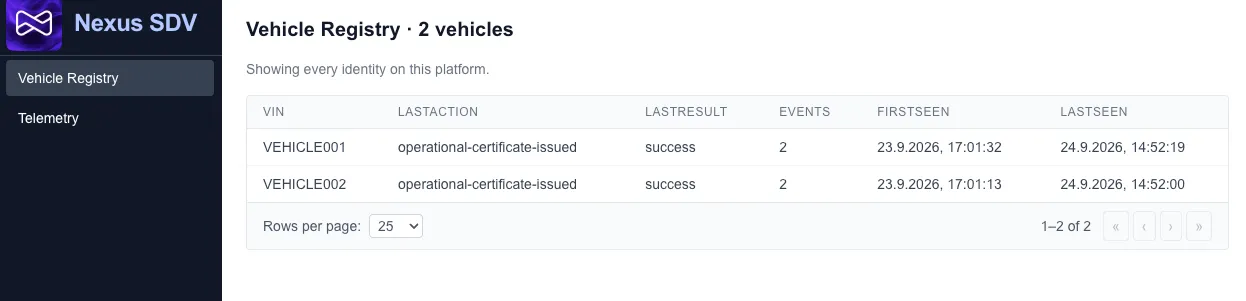
A vehicle appears here as soon as it has been issued a certificate — by the Factory Helper or by the registration server. Nobody maintains a list. If the view is empty, no certificate has been issued yet on this platform.
Selecting a row opens that vehicle’s full history: every recorded event, newest first, with when it happened, what was issued, by which service, and whether it succeeded.
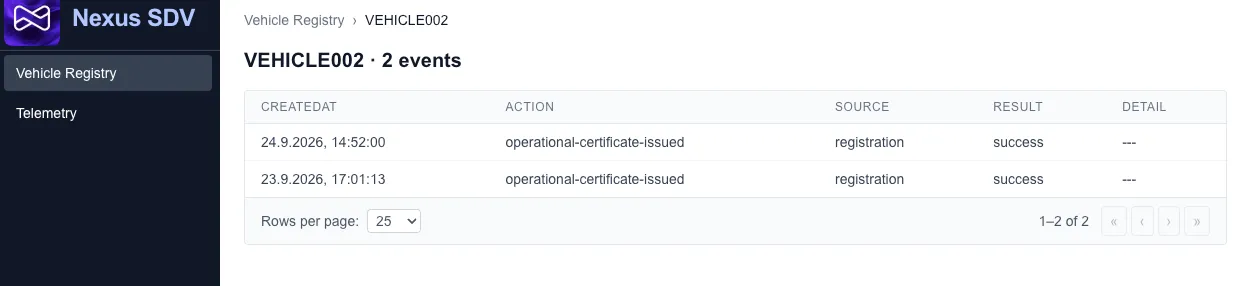 A vehicle that has been re-registered shows one entry per issuance,
so the history is where you see that it happened more than once. The breadcrumb
takes you back to the list.
A vehicle that has been re-registered shows one entry per issuance,
so the history is where you see that it happened more than once. The breadcrumb
takes you back to the list.
How the entries come to exist is described under Vehicle Registry.
Telemetry
Section titled “Telemetry”One row per vehicle that has sent data, with its identifier, when it was last heard from, and its most recent value for each signal it reports.
The columns are not a fixed list: they are whatever the vehicles on this platform actually send. A fleet that reports battery values shows battery columns; one that reports something else shows those instead.
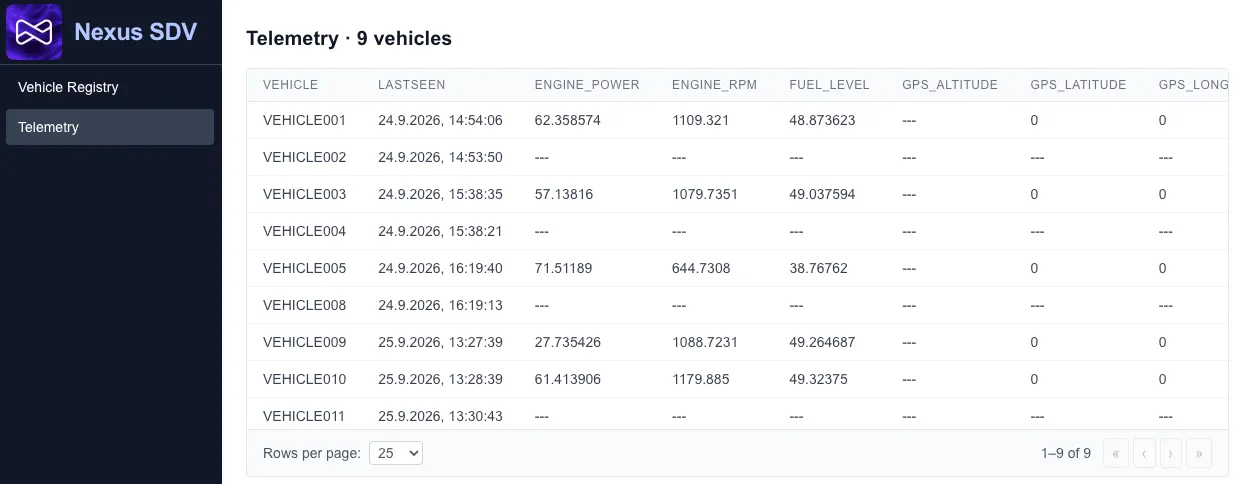
Selecting a row opens that vehicle.
Looking at one vehicle
Section titled “Looking at one vehicle”The detail page shows the recorded history rather than only the latest value:
- a time range — one hour, six hours, 24 hours or seven days
- a table of readings in that range, paged
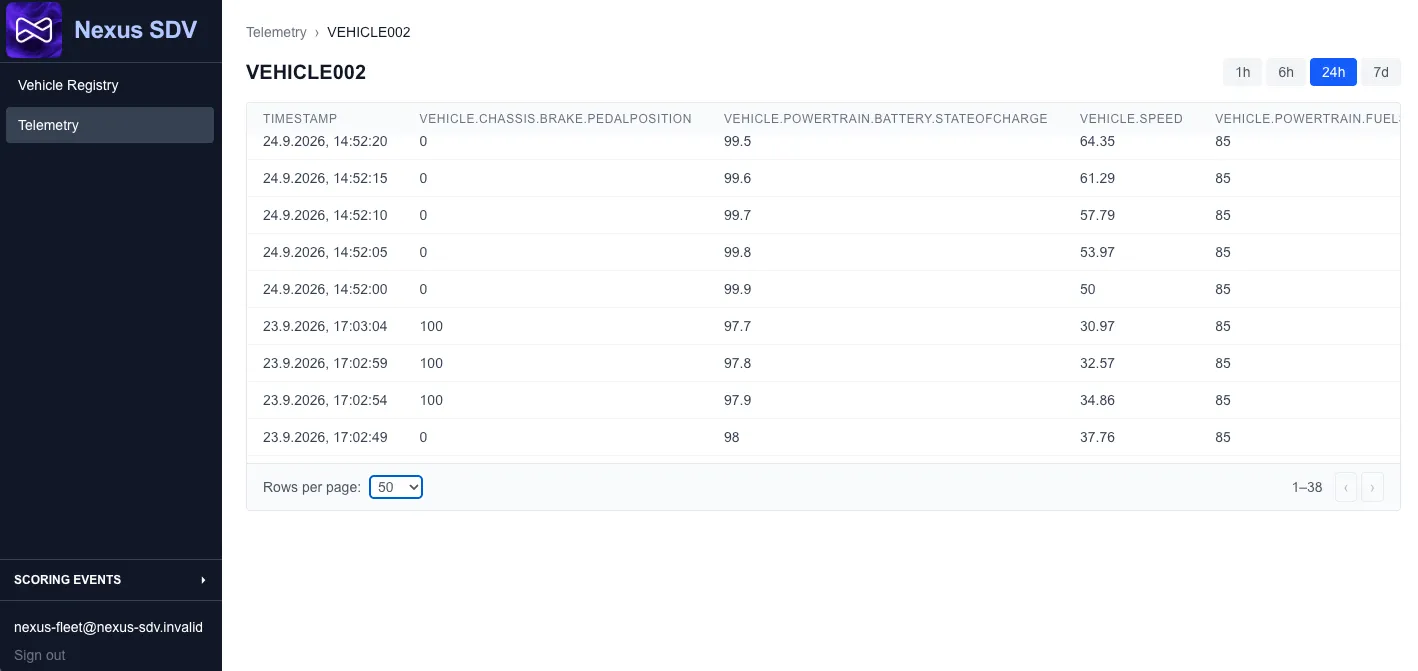
The newest page refreshes by itself every 30 seconds, so a vehicle that is currently publishing updates while you watch. Paging back into history stops the refreshing — otherwise the page would jump away under your hands.
Who sees which vehicles
Section titled “Who sees which vehicles”FleetView does not show every user everything. Visibility follows Keycloak group membership: a user sees the vehicles enrolled in the groups they belong to, and a user in no group sees nothing.
The bootstrap sets up:
| Object | Purpose |
|---|---|
Group nexus-fleet | the platform’s fleet; every issued vehicle is enrolled into it |
User nexus-fleet | the account you first sign in with, a member of that group |
Realm role nexus-admin | sees every recorded identity, including vehicles in no group at all |
The user created at bootstrap holds the admin role, so out of the box you see everything — which is what you want on a platform you have just deployed.
Giving other people access
Section titled “Giving other people access”Add them as users in the Keycloak realm sdv-telemetry and put them in a group.
What they see follows from that group alone; no FleetView configuration is
involved.
What FleetView is not
Section titled “What FleetView is not”It is a reference implementation, and it is deliberately small: there is no sorting, no filtering, no search, and no administration interface. Users, groups and roles are managed in Keycloak, and vehicle identities come from the registry rather than from anything you can edit here.
Treat it as the starting point for your own interface — the useful part is that it demonstrates the whole path, from a signed-in user through group-based visibility to the data a vehicle actually sent.