
Services
 Getting Started
Section titled “ Getting Started”This guide assumes that the Nexus platform has been successfully deployed and that both sample clients have ingested data, as covered in the previous guides. We will demonstrate how to retrieve this data using the Nexus Data API.
To continue with this guide, follow these steps:
-
Deploy the Data API Sampler We provide a sample Nexus application that is not part of the base services. You will need to deploy this component manually to your environment.
-
Request Data via REST Our examples utilize curl, though you can use any preferred REST client (e.g., Postman or Insomnia) to interact with the API.
Deploy the Data API Sampler
Section titled “Deploy the Data API Sampler”The sampler ships with its own Cloud Build pipeline, iac/cloudbuild/build-push-deploy-data-api-sampler.yaml. Submit that pipeline against the project your platform runs in to deploy or redeploy the service.
Check Deployment Success
Section titled “Check Deployment Success”Once the pipeline has completed, verify that the service was successfully deployed. You can find it in the Google Cloud Console under the GKE Workloads screen.
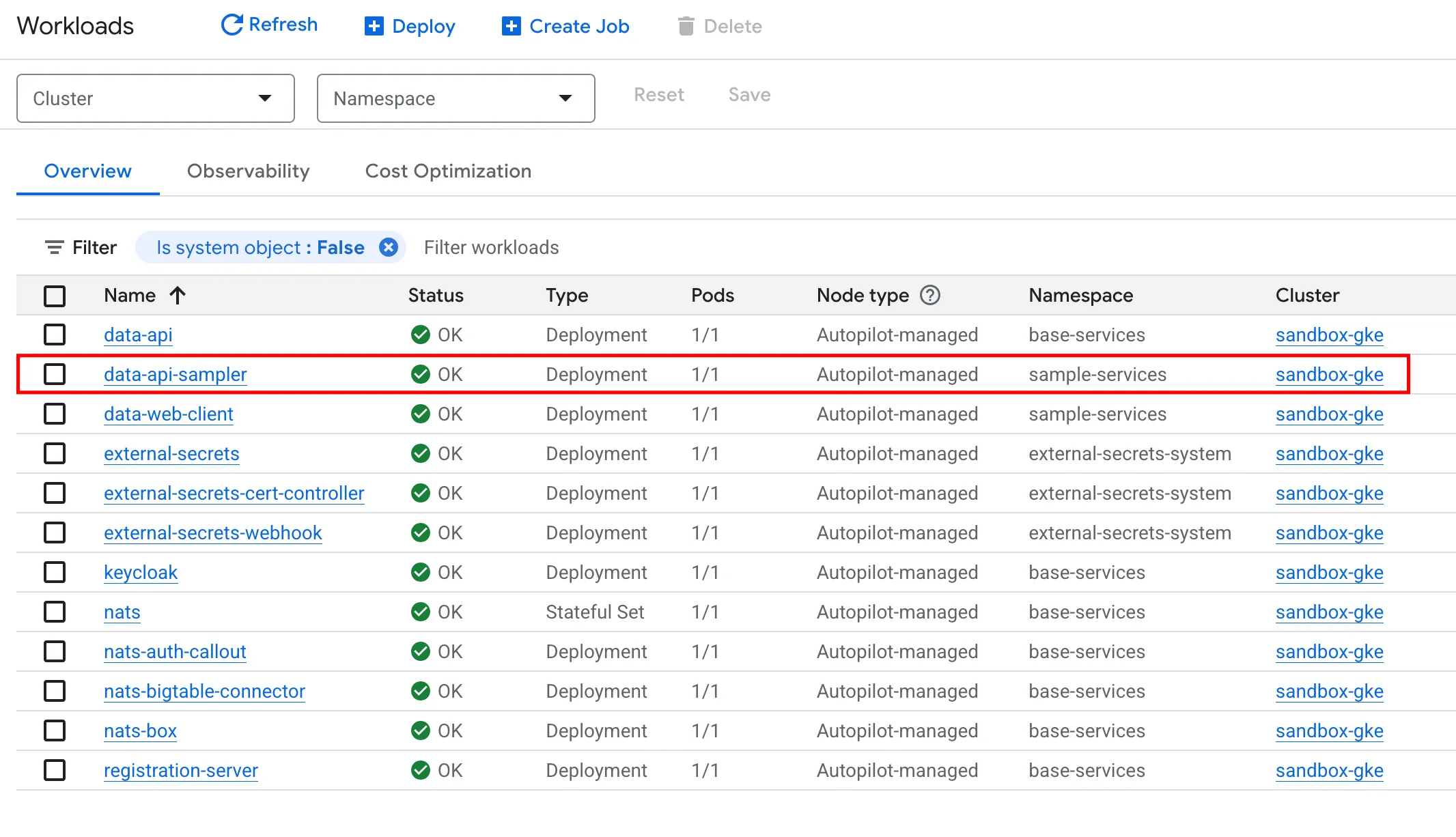
The service is deployed within a dedicated namespace called sample-services, keeping it isolated from the Nexus SDV base-services.
Retrieve Service Endpoint
Section titled “Retrieve Service Endpoint”The Data API Sampler is cluster-internal. From your workstation you reach it through a port forward, which needs the cluster credentials:
gcloud container clusters get-credentials <ENV>-gke --region <REGION> --project <PROJECT_ID> --dns-endpointkubectl port-forward -n sample-services svc/data-api-sampler 8080:8080Keep the port forward running in its own terminal. The service then answers on http://localhost:8080; the port forward itself is encrypted from your workstation to the pod.
Request Data via REST
Section titled “Request Data via REST”Now it is time to test the Data API Sampler. Run the following command and remember to replace the IP with your specific service endpoint:
$ curl http://localhost:8080/health | jq{ "groups": [ "liveness", "readiness" ], "status": "UP"}To request data a different URL is needed: http://localhost:8080/data/<VIN>/datatypes/<DATATYPE>:<PROPERTY_ID>?lookback=<LOOKBACK_TIME>
VINis used to identify the carDATATYPEspecifies whether a static or a dynamic property is requestedPROPERTY_IDspecifies the exact property to retrieveLOOKBACK_TIMEspecifies the timespan to look back for data.
You can use these commands to retrieve the data transmitted by the Go client:
$ curl -H "Authorization: Bearer $TOKEN" http://localhost:8080/data/VEHICLE001/datatypes/dynamic:battery.temp | jq{ "dynamic:battery.temp": [ "\"25.15\"" ]}$ curl -H "Authorization: Bearer $TOKEN" "http://localhost:8080/data/VEHICLE001/datatypes/dynamic:battery.temp?lookback=1d" | jq{ "dynamic:battery.temp": [ "\"24.81\"", "\"25.24\"", "\"25.08\"", "\"25.30\"", "\"25.16\"", "\"25.05\"", "\"25.00\"", "\"25.29\"", "\"25.15\"" ]}To retrieve data transmitted by the Python client, the request needs to be slightly modified:
$ curl -H "Authorization: Bearer $TOKEN" "http://localhost:8080/data/VEHICLE001/datatypes/static:index?lookback=1d" | jq{ "static:index": [ "\"0\"", "\"1\"", "\"2\"", "\"3\"", "\"4\"", "\"5\"", "\"6\"" ]}$ curl -H "Authorization: Bearer $TOKEN" "http://localhost:8080/data/VEHICLE001/datatypes/static:test_key?lookback=1d" | jq{ "static:test_key": [ "\"test_value\"", "\"test_value\"", "\"test_value\"", "\"test_value\"", "\"test_value\"", "\"test_value\"", "\"test_value\"" ]}Conclusion
Section titled “Conclusion”We hope this guide helped you understand how data can be retrieved from BigTable using the Data API Sampler. You can use this service as a template to build your own custom applications on top of Nexus.
We plan to provide more sample services soon, including the ones featured in our IAA Mobility 2025 showcase. You can view the corresponding video on our Nexus SDV landing page.