
Operating a Platform
 After the deployment
Section titled “ After the deployment”A platform that bootstrapped successfully is not finished business. This page is the short list of what to watch, and it is short on purpose: most questions are answered by one command.
The health check
Section titled “The health check”It runs three times a day on its own schedule — but only if the platform was
installed on the trigger path. The schedule pokes the Cloud Build trigger, and that
trigger needs the repository connection, so an install via gcloud builds submit
has no trigger and therefore no recurring check. Run it yourself, or connect the
repository and re-run the trigger setup. Where the schedule exists there is usually a recent
answer already under Cloud Build → History in your project. It verifies the
enabled APIs, the infrastructure, certificate expiry, the endpoints of Keycloak,
NATS and the registration server, and the state of each base service.
Each run ends with a summary:
ENVIRONMENT PASS WARN FAILmy-environment 41 0 0The number of checks depends on the platform — a local-PKI install runs fewer, because the DNS and certificate-authority checks do not apply. Read the WARN and FAIL columns, not the total.
The same counts go to a Cloud Monitoring dashboard named Platform health, so a platform that has been running for a while can be judged at a glance without opening a build log.
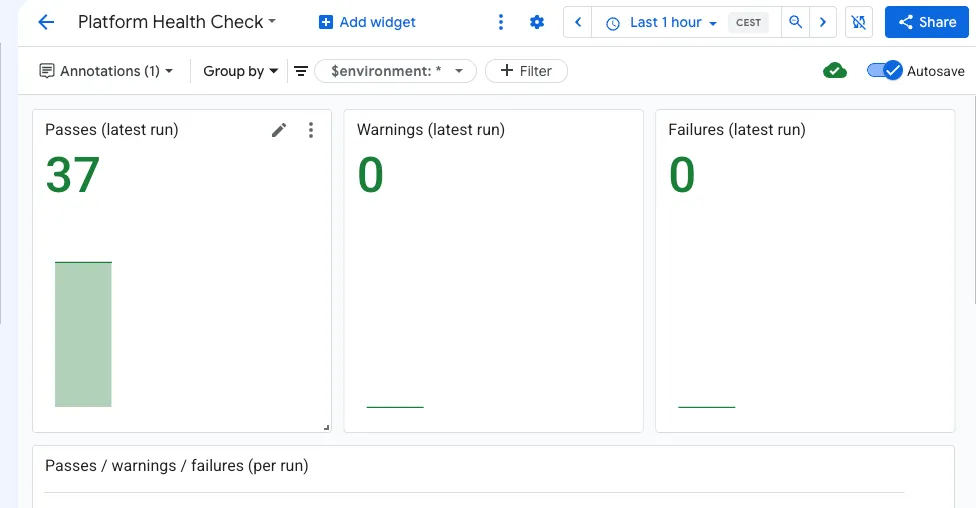
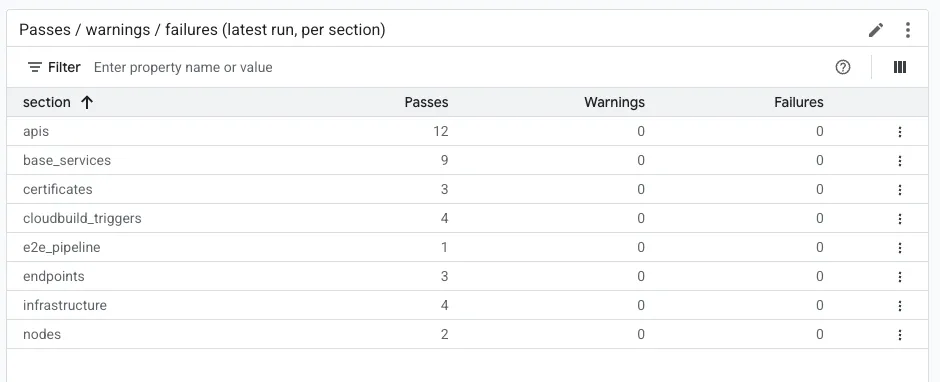
Below the tiles the same run is broken down by section, which is the fastest way to see what the check looked at and where a failure sits:
Running it yourself
Section titled “Running it yourself”The schedule covers the normal case. Run it on demand after a change, or when you want the end-to-end variant:
gcloud builds submit . --config=iac/cloudbuild/platform-health-check.yaml \ --project=<PROJECT_ID> --region=<REGION> \ --substitutions=^::^_TARGET_MODE=file::_BOOTSTRAP_ENV_GCS_PATH=gs://<PROJECT_ID>-bootstrap-envs/<name>.bootstrap_env_TARGET_MODE has to be set explicitly and decides what is checked: file for
one environment, dir for every environment in a bucket, project for
everything in a project. Adding _RUN_E2E=Y pushes real telemetry through the
platform and reads it back — slower, and the only check that proves the data
path rather than the deployment.
Certificates
Section titled “Certificates”Nexus holds no long-lived service credentials. Every service — Keycloak, the registration server, FleetView, the Factory Helper, the NATS leaf endpoint — runs on a certificate issued for 30 days by Google Certificate Authority Service, and the private keys of the authorities never leave Google-managed infrastructure. A compromised service certificate is therefore worth little and expires by itself.
The price of that is one recurring task, and this section is about it: these certificates are renewed deliberately, not automatically. The health check watches all five and warns seven days before any of them expires, so the task announces itself rather than surprising you.
./iac/operating/nexus-cert-status.sh # all five, with days remainingAll five certificates apply. Renew one when the health check warns, or at any time before it does.
The platform signs its own certificates and they last a year, so this is rarely urgent. Two of the five are never created on this path — FleetView’s and the Factory Helper’s — and the status script reports them as not issued with local PKI rather than as missing.
./iac/operating/nexus-cert-status.sh --warn-days 14 # widen the warning threshold./iac/operating/nexus-cert-status.sh --renew <NAME> # renew one — it asks firstRenewal re-runs the single pipeline that owns that certificate, so the outage is that one service restarting.
Vehicle credentials are a separate matter and are not covered by this script:
factory certificates last 730 days and operational certificates 90 by default,
both set in the .bootstrap_env. See
Security Architecture.
Sending telemetry through it
Section titled “Sending telemetry through it”The end-to-end proof that the data path works: a real client registers, authenticates, publishes, and the data arrives in BigTable.
gcloud builds submit . --config=iac/cloudbuild/run-sample-clients.yaml \ --project=<PROJECT_ID> --region=<REGION> \ --substitutions=_BOOTSTRAP_ENV_GCS_PATH=gs://<PROJECT_ID>-bootstrap-envs/<name>.bootstrap_envThis always produces the same two vehicles — their identifiers are part of the pipeline. To put more vehicles on the platform, run the sample clients yourself with your own VINs; see Clients.
Who to ask what
Section titled “Who to ask what”| Question | Where |
|---|---|
| Is the platform healthy? | the health check, or the Platform health dashboard |
| Which vehicles does it know? | the Vehicle Registry view in FleetView — every identity the platform has issued |
| What is a vehicle sending? | the Telemetry view in FleetView — one row per vehicle with its latest readings |
| Why can this user not see a vehicle? | Keycloak group membership — see Vehicle Registry |
| How do I remove the platform? | Teardown |